


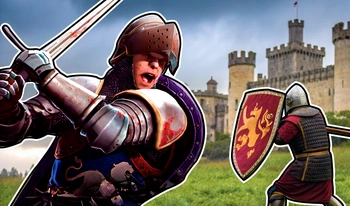
war the knights: battle arena swords 3d
war the knights: battle arena swords 3d
War The Knights: Battle Arena Swords 3D - Medieval Combat Game
War The Knights: Battle Arena Swords 3D is an action-packed medieval combat game that transports players to the heart of chivalrous battles. Experience intense team-based warfare where strategy and skill determine victory. This free-to-play 3D battle arena game offers thrilling sword fights, archery combat, and mounted warfare across diverse medieval landscapes.
Key features that make War The Knights stand out:
⚔️ Extensive weapon arsenal including swords, bows, spears, crossbows, and magical spells
🛡️ Dynamic combat system with blocking and parrying mechanics using shields
🏇 Unique mounted combat system - ride into battle on horseback for tactical advantages
❄️ Diverse battle environments with distinct terrain advantages (snowy fields, island fortresses, mountain passes)
🚩 Strategic flag capture system that controls respawn locations
👑 Team-based objectives with multiple victory conditions
🎮 Intuitive controls optimized for both mobile and PC gameplay
For players looking for tips: Master the timing of shield blocks, utilize terrain for cover in archery duels, and coordinate flag captures with your team for optimal respawn positioning. The game's physics-based combat system rewards skillful timing and positioning over simple button mashing.
War The Knights Gameplay Guide and Controls
Mastering War The Knights: Battle Arena Swords 3D requires understanding its deep combat mechanics and controls. Here's a comprehensive guide to help new players get started and veterans improve their skills:
Basic Game Objectives:
• Team Deathmatch: Eliminate enemy players to reach the kill count first
• Flag Control: Capture strategic points to gain respawn advantages
• Class Specialization: Choose between melee, ranged, or hybrid combat styles
Advanced Combat Techniques:
• Perfect Block: Time your shield blocks to stagger opponents
• Mounted Archery: Fire arrows while moving at speed for hit-and-run tactics
• Terrain Advantage: Use elevation for better bow range and visibility
Complete Control Scheme:
Movement: WASD keys (PC) or virtual joystick (mobile)
Combat Actions:
- Primary Attack: Left Mouse Button (LMB)
- Block/Aim: Right Mouse Button (RMB)
- Weapon Throw: Middle Mouse Button
- Weapon Switch: 1-4 keys for different loadouts
Special Moves:
- Sprint: Shift key (limited stamina system)
- Horse Mount/Dismount: Double-tap jump (Space)
- Team Communication: R key for quick commands
Pro Tip: Practice the timing of weapon throws in the training arena - a well-placed spear can instantly eliminate distant archers.
Where to Play War The Knights: Battle Arena Swords 3D Online
War The Knights: Battle Arena Swords 3D is available as a free-to-play browser game with no downloads required. Players can access the game through:
• Web browsers on PC (Chrome, Firefox, Edge recommended)
• Mobile browsers on Android and iOS devices
• Various HTML5 game portals and aggregator sites
The game features cross-platform compatibility, allowing mobile and PC players to battle together in the same arenas. No registration is needed to start playing - simply load the game and jump into battle. For optimal performance, ensure your device meets these requirements:
PC: Modern browser with WebGL support, 2GB RAM minimum
Mobile: iOS 11+/Android 7+ with 2GB RAM
The game uses cloud saving to preserve your progress across devices when logged in with a guest account. For competitive players, seasonal leaderboards track the top knights in various combat categories.
War The Knights: Cross-Platform Availability and Features
War The Knights: Battle Arena Swords 3D offers seamless cross-platform play between mobile and desktop devices. Key features across platforms include:
Mobile Version Highlights:
• Optimized touch controls with customizable button layouts
• Graphics presets for various device capabilities
• Gyroscope aiming support for precise archery
Desktop Version Advantages:
• Higher resolution textures and effects
• Keyboard and mouse precision controls
• Multi-monitor support for wider field of view
Cloud Sync Features:
• Unified account system tracks progress across devices
• Cross-platform friend lists and team creation
• Shared inventory for weapons and cosmetics
Performance Tips: Mobile players should enable 'Performance Mode' in settings for smoother framerates. PC players can adjust FOV (Field of View) for better situational awareness in melee combat. Both versions receive simultaneous updates with new maps, weapons, and balance changes.
User Comments (10)
The controls are a bit clunky.
Could be better with more levels.
The controls are a bit clunky.
Best game I've played this year!
Addictive gameplay, highly recommend!
Could be better with more levels.
Great game! Love the graphics.
Best game I've played this year!
Worth every penny!
Worth every penny!